
Access: Everyone.
Jump to a task
8.1 Language Switching
The application supports four languages:
- 🇬🇧 English (default)
- 🇸🇪 Svenska (Swedish)
- 🇳🇴 Norsk (Norwegian)
- 🇮🇸 Íslenska (Icelandic)
Change the language using the language selector. All menus, labels, and messages update to your selected language.
8.2 Sidebar & Mobile Menu
On desktop: The sidebar is visible on the left side of the screen when you're signed in. It contains all navigation sections grouped by role. Click section headers to expand/collapse each area.
On mobile: Tap the hamburger menu (☰) in the top navigation bar to open the sidebar as an overlay. Tap outside or click the close button to dismiss it.
When not signed in, the hamburger menu opens a simple top navigation with links to all public pages.
8.3 Organization Switcher
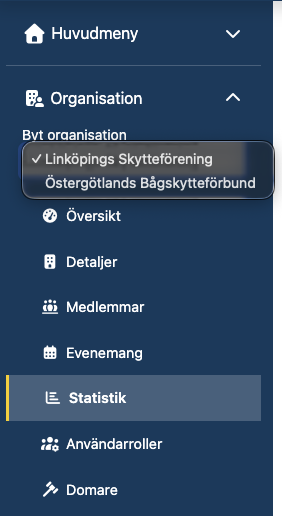
If you have administrator access to multiple organizations, the Organization Switcher dropdown appears at the top of the Organization sidebar section. Select a different club to switch context — all organization pages will then show data for the selected club.
Screenshots Reference
The screenshots in this guide correspond to the following pages. To add or update screenshots, save images to the docs/screenshots/ folder.
| Filename | Page |
|---|---|
signup.png |
Account creation form |
login.png |
Sign-in form |
login-legacy.png |
Legacy login tab |
migrate-account.png |
Migrate account page |
navigation.png |
Navigation overview (navbar + sidebar) |
upcoming-events.png |
Upcoming events list |
upcoming-events-filters.png |
Filter panel expanded |
upcoming-events-proximity.png |
Proximity search in use |
event-details.png |
Event detail page |
completed-events.png |
Completed events list |
event-results.png |
Event result page |
event-report.png |
Event report page |
organizations.png |
Organizations list with map |
organization-detail.png |
Organization detail page |
archers-search.png |
Archer search page |
archer-detail.png |
Archer profile page |
ranking.png |
Ranking page |
statistics-index.png |
Statistics overview |
statistics-attendance.png |
Attendance statistics |
statistics-age-class.png |
Age class breakdown |
profile.png |
User profile page |
org-dashboard.png |
Organization dashboard |
org-edit.png |
Organization edit page |
org-members.png |
Member list |
org-member-detail.png |
Member detail page |
org-events.png |
Organization events list |
org-event-create.png |
Event creation form |
org-event-competition-settings.png |
Competition settings panel |
org-event-report.png |
Event report page (organization) |
org-attendance.png |
Organization attendance statistics |
org-switcher.png |
Organization switcher dropdown |
judge-dashboard.png |
Judge instructor dashboard |
judge-licenses.png |
Judge licenses list with filter bar |
judge-search.png |
Member search for first-time judge |
judge-detail.png |
Judge detail page with license tabs |
judge-detail-assignments.png |
Judge assignments tab |
round-list.png |
Federation round list (with Clone) |
round-clone.png |
Clone round dialog |
mixed-team-ranking.png |
Mixed team ranking configuration |
sys-data-migration.png |
System data-migration tools |
profile-2fa-enroll.png |
Two-factor authentication setup |
user-guide-home.png |
This guide's personalized home |
© 2026 — Archery Result Service